Aug 2, 2025
Aug 2, 2025
Workflow Automation
Scaling Your Startup: Strategies for Growth
Scaling Your Startup: Strategies for Growth
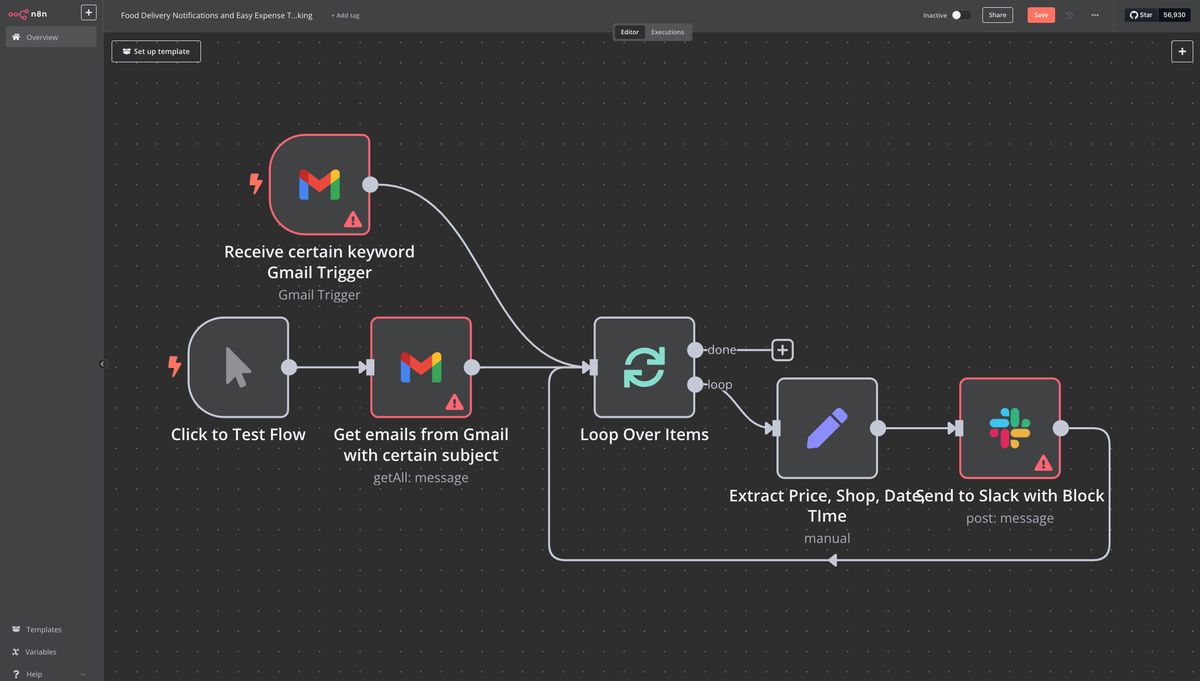
Workflow automation is transforming the way businesses operate, helping teams save time, reduce errors, and focus on high-value tasks. n8n, an open-source workflow automation tool, enables users to connect systems, automate repetitive tasks, and create efficient workflows. For beginners, building small hands-on projects is the best way to learn. Here are 10 beginner-friendly n8n project ideas to get you started.
Content
Content
Content
1. Automated Data Collection
Goal: Automatically gather data from multiple sources and consolidate it for easy management.
This project helps beginners understand how to use triggers and workflow automation to collect information efficiently.
Duration: 2–3 days
Difficulty: Beginner
Learning Outcomes: Learn workflow setup, data handling, and automation basics.
2. Scheduled Content Delivery
Goal: Automatically deliver updates or content at specified intervals.
This workflow allows users to schedule messages, reports, or updates to be sent regularly without manual effort.
Duration: 2–4 days
Difficulty: Beginner
Learning Outcomes: Learn scheduling automation, data processing, and workflow triggers.
3. Automated Notifications
Goal: Send instant notifications when a specific event occurs.
Use n8n to create workflows that trigger notifications based on predefined events, ensuring timely communication.
Duration: 1–2 days
Difficulty: Beginner
Learning Outcomes: Learn event triggers, notifications, and workflow logic.
4. Data Backup Automation
Goal: Automatically back up important files or data at regular intervals.
This project introduces users to automating routine backup processes to prevent data loss.
Duration: 1–2 days
Difficulty: Beginner
Learning Outcomes: Learn file handling, scheduling, and automated processes.
5. Monitoring and Alerts
Goal: Track changes in data or workflow status and generate alerts.
Create workflows that monitor activity and send alerts when specific conditions are met, improving responsiveness.
Duration: 2–3 days
Difficulty: Beginner
Learning Outcomes: Learn conditional logic, monitoring, and alert workflows.
6. Automated Form Responses
Goal: Send instant responses when new data or requests are submitted.
This project allows beginners to automate responses, ensuring immediate acknowledgment of incoming information.
Duration: 1–2 days
Difficulty: Beginner
Learning Outcomes: Learn triggers, automated replies, and workflow integration.
7. Data Aggregation
Goal: Combine data from multiple sources into a single structured format.
Use n8n to aggregate information efficiently for reporting or analysis purposes.
Duration: 2–3 days
Difficulty: Beginner
Learning Outcomes: Learn data consolidation, transformation, and workflow design.
8. Daily Updates Automation
Goal: Automatically generate and send daily updates or summaries.
This project demonstrates how to schedule workflows to provide consistent, timely information.
Duration: 1 day
Difficulty: Beginner
Learning Outcomes: Learn scheduling, data collection, and automated reporting.
9. Monitoring Online Content
Goal: Track changes or updates in online sources automatically.
Create a workflow that monitors content and triggers actions when updates occur, ensuring users stay informed.
Duration: 2–3 days
Difficulty: Beginner
Learning Outcomes: Learn content monitoring, automation triggers, and data handling.
10. Workflow-Based Task Management
Goal: Automate routine tasks to improve efficiency.
This project introduces beginners to task automation, streamlining repetitive processes without manual intervention.
Duration: 2–4 days
Difficulty: Beginner
Learning Outcomes: Learn workflow planning, automation logic, and task execution.
Conclusion
These 10 beginner-level n8n project ideas provide practical ways to learn workflow automation. They offer hands-on experience in triggers, automation, and data management while solving real-world challenges.By experimenting with these projects, beginners can build confidence, understand automation logic, and prepare for more advanced workflows in the future.
1. Automated Data Collection
Goal: Automatically gather data from multiple sources and consolidate it for easy management.
This project helps beginners understand how to use triggers and workflow automation to collect information efficiently.
Duration: 2–3 days
Difficulty: Beginner
Learning Outcomes: Learn workflow setup, data handling, and automation basics.
2. Scheduled Content Delivery
Goal: Automatically deliver updates or content at specified intervals.
This workflow allows users to schedule messages, reports, or updates to be sent regularly without manual effort.
Duration: 2–4 days
Difficulty: Beginner
Learning Outcomes: Learn scheduling automation, data processing, and workflow triggers.
3. Automated Notifications
Goal: Send instant notifications when a specific event occurs.
Use n8n to create workflows that trigger notifications based on predefined events, ensuring timely communication.
Duration: 1–2 days
Difficulty: Beginner
Learning Outcomes: Learn event triggers, notifications, and workflow logic.
4. Data Backup Automation
Goal: Automatically back up important files or data at regular intervals.
This project introduces users to automating routine backup processes to prevent data loss.
Duration: 1–2 days
Difficulty: Beginner
Learning Outcomes: Learn file handling, scheduling, and automated processes.
5. Monitoring and Alerts
Goal: Track changes in data or workflow status and generate alerts.
Create workflows that monitor activity and send alerts when specific conditions are met, improving responsiveness.
Duration: 2–3 days
Difficulty: Beginner
Learning Outcomes: Learn conditional logic, monitoring, and alert workflows.
6. Automated Form Responses
Goal: Send instant responses when new data or requests are submitted.
This project allows beginners to automate responses, ensuring immediate acknowledgment of incoming information.
Duration: 1–2 days
Difficulty: Beginner
Learning Outcomes: Learn triggers, automated replies, and workflow integration.
7. Data Aggregation
Goal: Combine data from multiple sources into a single structured format.
Use n8n to aggregate information efficiently for reporting or analysis purposes.
Duration: 2–3 days
Difficulty: Beginner
Learning Outcomes: Learn data consolidation, transformation, and workflow design.
8. Daily Updates Automation
Goal: Automatically generate and send daily updates or summaries.
This project demonstrates how to schedule workflows to provide consistent, timely information.
Duration: 1 day
Difficulty: Beginner
Learning Outcomes: Learn scheduling, data collection, and automated reporting.
9. Monitoring Online Content
Goal: Track changes or updates in online sources automatically.
Create a workflow that monitors content and triggers actions when updates occur, ensuring users stay informed.
Duration: 2–3 days
Difficulty: Beginner
Learning Outcomes: Learn content monitoring, automation triggers, and data handling.
10. Workflow-Based Task Management
Goal: Automate routine tasks to improve efficiency.
This project introduces beginners to task automation, streamlining repetitive processes without manual intervention.
Duration: 2–4 days
Difficulty: Beginner
Learning Outcomes: Learn workflow planning, automation logic, and task execution.
Conclusion
These 10 beginner-level n8n project ideas provide practical ways to learn workflow automation. They offer hands-on experience in triggers, automation, and data management while solving real-world challenges.By experimenting with these projects, beginners can build confidence, understand automation logic, and prepare for more advanced workflows in the future.
1. Automated Data Collection
Goal: Automatically gather data from multiple sources and consolidate it for easy management.
This project helps beginners understand how to use triggers and workflow automation to collect information efficiently.
Duration: 2–3 days
Difficulty: Beginner
Learning Outcomes: Learn workflow setup, data handling, and automation basics.
2. Scheduled Content Delivery
Goal: Automatically deliver updates or content at specified intervals.
This workflow allows users to schedule messages, reports, or updates to be sent regularly without manual effort.
Duration: 2–4 days
Difficulty: Beginner
Learning Outcomes: Learn scheduling automation, data processing, and workflow triggers.
3. Automated Notifications
Goal: Send instant notifications when a specific event occurs.
Use n8n to create workflows that trigger notifications based on predefined events, ensuring timely communication.
Duration: 1–2 days
Difficulty: Beginner
Learning Outcomes: Learn event triggers, notifications, and workflow logic.
4. Data Backup Automation
Goal: Automatically back up important files or data at regular intervals.
This project introduces users to automating routine backup processes to prevent data loss.
Duration: 1–2 days
Difficulty: Beginner
Learning Outcomes: Learn file handling, scheduling, and automated processes.
5. Monitoring and Alerts
Goal: Track changes in data or workflow status and generate alerts.
Create workflows that monitor activity and send alerts when specific conditions are met, improving responsiveness.
Duration: 2–3 days
Difficulty: Beginner
Learning Outcomes: Learn conditional logic, monitoring, and alert workflows.
6. Automated Form Responses
Goal: Send instant responses when new data or requests are submitted.
This project allows beginners to automate responses, ensuring immediate acknowledgment of incoming information.
Duration: 1–2 days
Difficulty: Beginner
Learning Outcomes: Learn triggers, automated replies, and workflow integration.
7. Data Aggregation
Goal: Combine data from multiple sources into a single structured format.
Use n8n to aggregate information efficiently for reporting or analysis purposes.
Duration: 2–3 days
Difficulty: Beginner
Learning Outcomes: Learn data consolidation, transformation, and workflow design.
8. Daily Updates Automation
Goal: Automatically generate and send daily updates or summaries.
This project demonstrates how to schedule workflows to provide consistent, timely information.
Duration: 1 day
Difficulty: Beginner
Learning Outcomes: Learn scheduling, data collection, and automated reporting.
9. Monitoring Online Content
Goal: Track changes or updates in online sources automatically.
Create a workflow that monitors content and triggers actions when updates occur, ensuring users stay informed.
Duration: 2–3 days
Difficulty: Beginner
Learning Outcomes: Learn content monitoring, automation triggers, and data handling.
10. Workflow-Based Task Management
Goal: Automate routine tasks to improve efficiency.
This project introduces beginners to task automation, streamlining repetitive processes without manual intervention.
Duration: 2–4 days
Difficulty: Beginner
Learning Outcomes: Learn workflow planning, automation logic, and task execution.
Conclusion
These 10 beginner-level n8n project ideas provide practical ways to learn workflow automation. They offer hands-on experience in triggers, automation, and data management while solving real-world challenges.By experimenting with these projects, beginners can build confidence, understand automation logic, and prepare for more advanced workflows in the future.